
 By Binh
As I have shared in Setting Up Nagios Core with Nginx on Ubuntu 24.04 and Automating Nagios Host and Service Discovery with Consul. We have learned how to set up Nagios Core on an Ubuntu server, and also how to automate Nagios configuration for detecting Host and Service automatically by leveraging the Consul Service Discovery tool from Hashicorp. I would recommend you read them first to have grasp of what we will do in this article.
That being said, both blogs still require manual steps to set up Nagios or configure Nagios Host and Service Discovery. Even with Consul in place to streamline the process of Host and Service Discovery, we still need to manually set up the Consul Agent on each host (Server or Docker) to allow Consul to handle the config automation from there. Therefore, this article aims to automate the process of both blogs above.
Continue developing another use case of Puppet, and we will learn how to speed up Nagios setup in an automatic way, as well as deploy Consul setup when launching a new host. That’s when we have a robust system which automatically brings any new host up, joins the Consul Cluster, and also has all related components that we want to monitor configured in Nagios.

Prerequisites
- Have Puppet Server installed. The Puppet Server applies a Roles and Profiles architecture that I implemented in the previous blogs. You may at least want to read Setup Puppet 8 on Ubuntu 24.04 – Configuration Management for a Scaling Enterprise and Mastering Puppet: Implementing Roles and Profiles Effectively in Reality to set up the prerequisites. For more information, you can look at other posts in Puppet Series.
- Require knowledge of Consul and Nagios setup. At least you know how to install and configure Consul in
server/agentmode, and also know how to add a host manually to Nagios. - Have built a Consul Cluster of at least 3 nodes. If you want to test, you can build a standalone Consul server (running in
devmode). You may want to look at sections 2 and 3 in Consul Service Discovery: Automate Nginx Upstream updates for dynamic load balancing blog to know more about how to set up a single Consul server. I also wrote the Puppet Series – Automate Consul Cluster Setup blog to build a Consul Cluster of three nodes with Puppet in case you’re interested. Otherwise, please consult HashiCorp documentation for more information. - Prepare an Ubuntu 24.04 server (called nagios-server) where we deploy the configuration for Nagios, Nginx, and Consul Agent by Puppet.
- Prepare another Ubuntu 24.04 server (called app-01), which plays the role of a host that Nagios will monitor. Again, we will configure Puppet to deploy the Consul Agent setup for it as well.
| Hostname | IP address | Role |
| puppet-master.srv.local | 192.168.68.117 | Puppet Server (Master) |
| app-01.srv.local | 192.168.68.60 | Run the application with Consul Agent installed |
| consul-01.srv.local | 192.168.68.55 | Consul Server Node 1 |
| consul-02.srv.local | 192.168.68.56 | Consul Server Node 2 |
| consul-02.srv.local | 192.168.68.57 | Consul Server Node 2 |
| nagios-server.srv.local | 192.168.68.54 | Nagios server with Consul Agent installed |
- I assumed that the nagios-server, app-01, and consul servers were registered as Puppet Agents on the Puppet Server.
- All the codes in this blog can be found in
https://gitlab.com/binhdt2611/puppet-demofor your reference. For the changes in details, you can view them in this merge request.
Adding modules to facilitate Nagios setup
As usual from the previous blogs, under the project root path in https://gitlab.com/binhdt2611/puppet-demo, we create a branch named feat_nagios_setup, and start developing on this branch.
Next, we will need to include the following modules and their dependency modules in the Puppetfile file (still under the project root path).
mod 'puppetlabs-nagios_core', '1.0.3'
mod 'puppet-nrpe', '6.0.0'
mod 'puppet-nginx', '6.0.1'
The puppet-nrpe module is to manage the installation and configuration of NRPE on host machines (e.g. app-01 in our case). NRPE, as you may know, allows us to remotely execute Nagios plugins on other Linux/Unix machines from the Nagios server. While the puppetlabs-nagios_core module allows us to manage Nagios’s various configuration files.
The puppet-nginx mode is included in Mastering Puppet: Implementing Roles and Profiles Effectively In Reality, so I won’t add it to this branch. If you haven’t, please add it as well because we need it to configure Nginx.
Bear in mind that we also need to include dependency modules for the “puppet-nrpe” module. Check the Dependencies tab on the puppet-nrpe link for more information.
Part 1: Setting up Nagios and NRPE
Overview of a Nagios profile class
Just a quick overview of the classes we will create. We will need to create a central profile class named profiles::nagios. This profile class applies all Nagios-related configurations to a Nagios server. In this profiles::nagios class, we include sub-classes as below, and each of them will be in charge of the setup steps. We have a hierarchy of classes:
- class
profiles::nagios: is the main central class that represents all configurations that a Nagios server needs. It includes:- class
profiles::nagios::install: Download and install Nagios from source code - class
profiles::nagios::configure: Set up and Configure Nagios configuration files - class
profiles::nagios::plugin: Download and install Nagios Plugin from source code, for Nagios server only. - class
profiles::nagios::service: Manage Nagios service to ensure it’s running after all the above classes are set up. It also manages other services such asfcgiwrapandphp8.3-fpm. - class
nginx: call to puppet-nginx module to set up Nagios site.
- class
- class
profiles::nagios::nrpe: Download and install, and configure NRPE package as well as NRPE check commands. - class
roles::nagios: is the main role that Nagios attaches to, Puppet apply this role to nagios-server server. This role includes:- Inherit all configurations from
roles::base - Apply
profiles::nagios - Apply
profiles::nagios::nrpe - Apply
profiles::consul
- Inherit all configurations from
Create profile classes for setting up Nagios
Create a central “profiles::nagios” class
Still under the project root path, we create a site/profiles/manifests/nagios.pp file. That’s where we add class profiles::nagios {}, and we declare the following content:
# Class: profiles::nagios
#
#  Install and setup Nagios-related configurations for a Nagios server
#  We can also include other classes (for other configurations) here that the Nagios server need
#
class profiles::nagios (
  String $package_name        = 'nagios',
  String $package_ensure      = '4.5.9',
  String $repository_url      = 'https://github.com/NagiosEnterprises/nagioscore/releases/download',
  String $full_pkg_name       = "${package_name}-${package_ensure}",
  String $archive_name        = "${full_pkg_name}.tar.gz",
  String $nagios_package_source = "${repository_url}/${full_pkg_name}/${archive_name}",
  String $install_path        = '/opt/nagios',
  String $config_path         = '/usr/local/nagios/etc',
  String $full_extracted_path = "${install_path}/${full_pkg_name}",
  String $admin_user,
  String $admin_password,
  String $owner               = 'nagios',
  String $group               = 'nagios',
) {
  contain profiles::nagios::install
  contain profiles::nagios::plugin
  contain profiles::nagios::configure
  contain profiles::nagios::service
  include nginx

  # Nginx server block configuration for nagios-server.srv.local site.
  nginx::resource::server { 'nagios-server.srv.local':
    listen_port          => 80,
    www_root             => '/usr/local/nagios/share',
    access_log           => '/var/log/nginx/nagios.access.log',
    error_log            => '/var/log/nginx/nagios.error.log',
    auth_basic           => 'Nagios Auth',
    auth_basic_user_file => '/usr/local/nagios/etc/htpasswd.users',
    use_default_location => false,
    raw_prepend          => ['rewrite ^/nagios/(.*) /$1;'],
    locations            => {
      '/'                => {
        try_files => ['$uri', '$uri/', 'index.php'],
      },
      '~ ^/?(.*\\.php)$' => {
        try_files => ['$uri = 404'],
        fastcgi   => 'unix:/run/php/php8.3-fpm.sock',
      },
      '~ \\.cgi$'        => {
        fastcgi_param => {
          'AUTH_USER'   => '$remote_user',
          'REMOTE_USER' => '$remote_user',
        },
        fastcgi       => 'unix:/run/fcgiwrap.socket',
      },
    },
    # locations_defaults sets configurations that all "locations" defined above should have
    locations_defaults   => {
      www_root    => undef,
      index_files => [],
    },
  }

  # Specify execution order of classes
  Class['profiles::nagios::install']
  -> Class['profiles::nagios::plugin']
  -> Class['profiles::nagios::configure']
  -> Class['profiles::nagios::service']
  -> Class['nginx']
}
The class nginx::resource::server is to set the Nginx configuration defined in the section Configure_Nginx_site.
Two varaibles $admin_user and $admin_password are username and password for basic Nginx authentication. Puppet looks up them from an encrypted hiera data file. Before we create this encrypted file, we need to get the encrypted string for the $admin_password. If you don’t understand the step below, please read Managing Sensitive Data in Puppet Using Hiera-eyaml for more information.
Still under the project root path, I run:
eyaml encrypt -s "PleaseChangeMe"
Output looks like:
string: ENC[PKCS7,MIIBeQYJKoZIhvcNAQcDoIIBajCCAWY.......ALuhNO1dzb75shgBBI14qsG5plRQvsKyz1gAnS]

OR

block: >
  ENC[PKCS7,MIIBeQYJKoZIhvcNAQcDoIIBajCCAWYCAQAxggEhMIIBHQIBAD
  ...
  ALuhNO1dzb75shgBBI14qsG5plRQvsKyz1gAnS]
We copy the encrypted content of the block >. Then, we will need to create data/secrets/nagios-server.srv.local.eyaml and add the following content:
profiles::nagios::admin_user: nagiosadmin
# Past the encrypted content here.
profiles::nagios::admin_password: >
  ENC[PKCS7,MIIBeQYJKoZIhvcNAQcDoIIBajCCAWYCAQAxggEhMIIBHQIBAD
  AFMAACAQEwDQYJKoZIhvcNAQEBBQAEggEAlu9N9H6iKvgGLZavl1TjAH1H1O
  fMbmsupO2YCCZTI0bAA1UFnKFNMNJo0JfZ9ch9TJxAC4Pqh1MgCz/wZ5Fw7e
  jpPg/nGbaM5m2SJ6GkZTwhLSQA/lR9SAiFYrdpnkp+tzUwoWK7jI7I/xIutx
  CVj91i7vIYAw+9pCztHigWwGI3zeel3REGt8XC6hyqalYmiE6JFcXsWInE8+
  qPSSZ8+WDbcTnK3TLV3FnJEEUDr9cDKCkiA4u6FUTG8SGvWMnv3PFMqkRZ83
  6CWUlPEG7cAw11XKlrRFg8ztYgpqhfKQzTPII/ObREhEyIrT2bl4GyB/dXqQ
  WInHW570bxLUETyjA8BgkqhkiG9w0BBwEwHQYJYIZIAWUDBAEqBBC3Sdlcf7
  ALuhNO1dzb75shgBBI14qsG5plRQvsKyz1gAnS]
That’s where Puppet looks up values of $admin_user and $admin_password.
Create a “profiles::nagios::install” class for downloading and installing Nagios
When the profiles::nagios is called, it starts applying profiles::nagios::install class. Therefore, we will create a folder site/profiles/manifests/nagios/ which stores site/profiles/manifests/nagios/install.pp and all subsequent classes we will create later.
Now, after we create site/profiles/manifests/nagios/install.pp file, add the following content:
# Class: profiles::nagios::install
#
#  Download and Install Nagios from source code
#
class profiles::nagios::install {
  $nagios_owner          = $profiles::nagios::owner
  $nagios_group          = $profiles::nagios::group
  $full_pkg_name         = $profiles::nagios::full_pkg_name
  $archive_name          = $profiles::nagios::archive_name
  $nagios_package_source = $profiles::nagios::nagios_package_source
  $install_path          = $profiles::nagios::install_path
  $full_extracted_path   = $profiles::nagios::full_extracted_path

  file { $install_path:
    ensure => directory,
  }

  # Make sure apache2 packages are not installed.
  $unavailable_packages = [
    'apache2-bin',
    'apache2',
    'libapache2-mod-php8.3',
  ]
  package { $unavailable_packages:
    ensure   => absent,
    provider => apt,
  }

  ::apt::pin { 'Forbidden packages':
    explanation => 'Force Apt ignore this package even it is in depends',
    packages    => $unavailable_packages,
    release     => '*',
    priority    => -1,
  }

  $required_packages = [
    'autoconf',
    'gcc',
    'libc6',
    'make',
    'wget',
    'libgd-dev',
    'ufw',
    'openssl',
    'libssl-dev',
    'apache2-utils', # Contain htpasswd command to create hash password for basic Nginx Auth

    # If we plan to set up a PHP class to install on any web server in the future
    # We can consider move these php-* packages to a separate profile.
    # That's when we can just call that profile, e.g. profiles::php::install
    # without declaring these packages here. In this example, I'll set up
    # them here for simplicity.
    'php8.3',
    'php8.3-fpm',
    'php8.3-common',
    'php8.3-cli',
    'php8.3-mbstring',
    'php8.3-bcmath',
    'php8.3-mysql',
    'php8.3-zip',
    'php8.3-gd',
    'php8.3-curl',
    'php8.3-xml',

    'fcgiwrap',
  ]

  # Installs all required packages
  package { $required_packages:
    ensure => 'present',
  }

  # Download the Nagios Core source code and extract it to a desired path.
  archive { $archive_name:
    path         => "/tmp/${archive_name}",
    source       => $nagios_package_source,
    extract      => true,
    extract_path => $install_path,
    creates      => $full_extracted_path,
    cleanup      => true,
    require      => File[$install_path],
  }

  # Create user and group: 'www-data'
  group { 'www-data':
    ensure => present,
  }

  user { 'www-data':
    ensure  => present,
    gid     => 'www-data',
    require => Group['www-data'],
  }

  # Create user and group: 'nagios', also assign 'nagios' user to 'www-data' group.
  group { $nagios_owner:
    ensure => present,
  }

  user { $nagios_group:
    ensure  => present,
    gid     => $nagios_group,
    groups  => 'www-data',
    require => [Group[$nagios_group], Group['www-data']],
  }

  ## This section is to install Nagios Core

  # Execute the Nagios Core configure script
  # The 'creates' attribute is to tell Puppet should run 'configure' once
  # if the specified file does not exist. Indicates that we haven't set up Nagios.
  # If this 'exec' attribute doesn't run, all the subsequent exec skip
  # running as well.
  exec { 'Creating Nagios sample config files':
    command => "${full_extracted_path}/configure --with-httpd-conf=/etc/nginx/sites-enabled",
    cwd     => $full_extracted_path,
    creates => '/usr/lib/systemd/system/nagios.service',
    require => Archive[$archive_name],
  }

  # Compile the main program and CGI
  ~> exec { 'Compiling the main program':
    command => 'make all',
    cwd     => $full_extracted_path,
    creates => '/usr/lib/systemd/system/nagios.service',
  }

  # Installs Nagios Core, it includes the binary files, CGIs, and HTML files.
  ~> exec { 'Installing Nagios Core':
    command => 'make install',
    cwd     => $full_extracted_path,
    creates => '/usr/lib/systemd/system/nagios.service',
  }

  # Set up the service or daemon files and also configures them to start on boot.
  ~> exec { 'Creating systemd config files for nagios service':
    command => 'make install-daemoninit',
    cwd     => $full_extracted_path,
    creates => '/usr/lib/systemd/system/nagios.service',
  }

  # Installs and configures the external command file
  # 'refreshonly' attribute makes this exec runs only if the previous exec runs
  ~> exec { 'Installing external commands.cfg file':
    command     => 'make install-commandmode',
    cwd         => $full_extracted_path,
    refreshonly => true,
  }

  # Installs Nagios sample configuration files
  ~> exec { 'Installing Nagios sample configuration files':
    command     => 'make install-config',
    cwd         => $full_extracted_path,
    refreshonly => true,
  }
}
Create a “profiles::nagios::configure” class for managing Nagios configuration files
After the profiles::nagios::install class downloads and installs a basic Nagios from source code, it starts applying class profiles::nagios::configure to configure necessary configuration files.
We continue creating site/profiles/manifests/nagios/configure.pp file and add the following content:
# Class: profiles::nagios::configure
#
#   This class set up necessary config files for Nagios
#
class profiles::nagios::configure {
  $nagios_config_path    = $profiles::nagios::config_path
  $nagios_admin_user     = $profiles::nagios::admin_user
  $nagios_admin_password = Sensitive($profiles::nagios::admin_password)
  $owner                 = $profiles::nagios::owner
  $group                 = $profiles::nagios::group

  File {
    owner => $owner,
    group => $group,
  }

  exec { "Create ${nagios_admin_user} for Nginx Authentication":
    command => "htpasswd -nbm ${nagios_admin_user} ${nagios_admin_password.unwrap()} > ${nagios_config_path}/htpasswd.users",
    path    => ['/usr/bin','/usr/sbin'],
    creates => "${nagios_config_path}/htpasswd.users",
  }

  # Fix Nginx can't find path of /cgi-bin/*.cgi in the "root" path at /usr/local/nagios/share
  file { '/usr/local/nagios/share/cgi-bin':
    ensure => link,
    target => '/usr/local/nagios/sbin',
  }

  # Create folder to store config files that we create manually or by Puppet.
  file { "${nagios_config_path}/objects/servers":
    ensure => directory,
  }

  # Create folder to store all config files generated by consul-template
  file { "${nagios_config_path}/objects/consul_sd_configs":
    ensure => directory,
  }

  # Path to store host config files when we add them manually
  file_line { 'Add servers object path':
    ensure => present,
    path   => "${nagios_config_path}/nagios.cfg",
    line   => "cfg_dir=${nagios_config_path}/objects/servers",
    after  => "#cfg_dir=${nagios_config_path}/servers",
  }

  # Path to store host config files generated by Consul
  file_line { 'Add consul-generated object path':
    ensure => present,
    path   => "${nagios_config_path}/nagios.cfg",
    line   => "cfg_dir=${nagios_config_path}/objects/consul_sd_configs",
    after  => "#cfg_dir=${nagios_config_path}/servers",
  }

  # If you have any other username, you will need to add that user in all fields "authorized_*"" below.
  file_line { 'Set value for authorized_for_system_information ':
    ensure => present,
    path   => "${nagios_config_path}/cgi.cfg",
    line   => "authorized_for_system_information=${nagios_admin_user}",
    match  => '^authorized_for_system_information=',
  }

  file_line { 'Set value for authorized_for_configuration_information ':
    ensure => present,
    path   => "${nagios_config_path}/cgi.cfg",
    line   => "authorized_for_configuration_information=${nagios_admin_user}",
    match  => '^authorized_for_configuration_information=',
  }

  file_line { 'Set value for authorized_for_system_commands ':
    ensure => present,
    path   => "${nagios_config_path}/cgi.cfg",
    line   => "authorized_for_system_commands=${nagios_admin_user}",
    match  => '^authorized_for_system_commands=',
  }

  file_line { 'Set value for authorized_for_all_services ':
    ensure => present,
    path   => "${nagios_config_path}/cgi.cfg",
    line   => "authorized_for_all_services=${nagios_admin_user}",
    match  => '^authorized_for_all_services=',
  }

  file_line { 'Set value for authorized_for_all_hosts ':
    ensure => present,
    path   => "${nagios_config_path}/cgi.cfg",
    line   => "authorized_for_all_hosts=${nagios_admin_user}",
    match  => '^authorized_for_all_hosts=',
  }

  file_line { 'Set value for authorized_for_all_service_commands ':
    ensure => present,
    path   => "${nagios_config_path}/cgi.cfg",
    line   => "authorized_for_all_service_commands=${nagios_admin_user}",
    match  => '^authorized_for_all_service_commands=',
  }

  file_line { 'Set value for authorized_for_all_host_commands ':
    ensure => present,
    path   => "${nagios_config_path}/cgi.cfg",
    line   => "authorized_for_all_host_commands=${nagios_admin_user}",
    match  => '^authorized_for_all_host_commands=',
  }

  # Set up Host Template Definition file
  file { "${nagios_config_path}/objects/servers/hosts-template.cfg":
    ensure  => file,
    source  => 'puppet:///modules/profiles/nagios/etc/hosts-template.cfg',
    require => File["${nagios_config_path}/objects/servers"],
  }

  # Set up Service Template Definition file
  file { "${nagios_config_path}/objects/servers/services-template.cfg":
    ensure  => file,
    source  => 'puppet:///modules/profiles/nagios/etc/services-template.cfg',
    require => File["${nagios_config_path}/objects/servers"],
  }

  # Set up Contact and Contact Group Definition file
  file { "${nagios_config_path}/objects/servers/contact-template.cfg":
    ensure  => file,
    source  => 'puppet:///modules/profiles/nagios/etc/contact-template.cfg',
    require => File["${nagios_config_path}/objects/servers"],
    notify  => Exec['Testing Nagios Config'],
  }

  # Set up Nagios Command Template Definition file
  Nagios_command {
    ensure  => present,
    mode    => '0644',
    target  => "${nagios_config_path}/objects/servers/nagios_commands.cfg",
    notify  => Service['nagios'],
    require => File["${nagios_config_path}/objects/servers"],
  }

  create_resources(nagios_command, lookup('profiles::nagios::commands', Hash, 'deep'))
}
The profiles::nagios::configure class sets up Nagios Hosts/Services/Contact Template Definition files based on a set of template files that I defined in site/profiles/files/nagios/etc/ under the project root path. We need to create this folder and add the following files (these files are described in the section Test_adding_a_new_host from the Setting Up Nagios Core with Nginx on Ubuntu 24.04 article):
Create site/profiles/files/nagios/etc/hosts-template.cfg file with content:
# Set "all-servers" template for each host definition to use
define host {
    name                            all-servers    ; The name of this host template
    notifications_enabled           1       ; Host notifications are enabled
    event_handler_enabled           1       ; Host event handler is enabled
    flap_detection_enabled          1       ; Flap detection is enabled
    process_perf_data               1       ; Process performance data
    retain_status_information       1       ; Retain status information across program restarts
    retain_nonstatus_information    1       ; Retain non-status information across program restarts
    check_command                   check-host-alive ; Default command to check if servers are "alive"
    check_interval                  5       ; Actively check the server every 5 minutes
    max_check_attempts              10      ; Check each server 10 times (max)
    notification_interval           30      ; Resend notifications every 30 minutes
    notification_period             24x7    ; Send notification out at any time - day or night
    notification_options            d,u     ; Only send notifications for specific host states
    contact_groups                  sysadmins  ; Notifications get sent to the sysadmins group
    register                        0       ; DONT REGISTER THIS DEFINITION - ITS NOT A REAL HOST, JUST A TEMPLATE!
}
Create site/profiles/files/nagios/etc/services-template.cfg file with content:
# Set "hosts-service" template for each service definition to use
define service {

    name                            hosts-service         ; The 'name' of this service template
    active_checks_enabled           1                       ; Active service checks are enabled
    passive_checks_enabled          1                       ; Passive service checks are enabled/accepted
    parallelize_check               1                       ; Active service checks should be parallelized (disabling this can lead to major performance problems)
    obsess_over_service             1                       ; We should obsess over this service (if necessary)
    check_freshness                 0                       ; Default is to NOT check service 'freshness'
    notifications_enabled           1                       ; Service notifications are enabled
    event_handler_enabled           1                       ; Service event handler is enabled
    flap_detection_enabled          1                       ; Flap detection is enabled
    process_perf_data               1                       ; Process performance data
    retain_status_information       1                       ; Retain status information across program restarts
    retain_nonstatus_information    1                       ; Retain non-status information across program restarts
    is_volatile                     0                       ; The service is not volatile
    check_period                    24x7                    ; The service can be checked at any time of the day
    max_check_attempts              3                       ; Re-check the service up to 3 times in order to determine its final (hard) state
    check_interval                  10                      ; Check the service every 10 minutes under normal conditions
    retry_interval                  2                       ; Re-check the service every two minutes until a hard state can be determined
    contact_groups                  sysadmins                  ; Notifications get sent out to everyone in the 'sysadmins' group
    notification_options            w,u,c,r                 ; Send notifications about warning, unknown, critical, and recovery events
    notification_interval           60                      ; Re-notify about service problems every hour
    notification_period             24x7                    ; Notifications can be sent out at any time
    register                        0                       ; DON'T REGISTER THIS DEFINITION - ITS NOT A REAL SERVICE, JUST A TEMPLATE!
}
Create site/profiles/files/nagios/etc/contact-template.cfg file with content:
define contact {
    contact_name            your-name              ; Short name of user
    use                     generic-contact        ; Inherit default values from generic-contact template (defined above)
    alias                   your-full-name         ; Full name of user
    email                   example@your-email.com ; <<***** CHANGE THIS TO YOUR EMAIL ADDRESS ******
}

define contactgroup {

    contactgroup_name       sysadmins
    alias                   Nagios System Administrators
    members                 your-name
}
In the profiles::nagios::configure class, we also have this line below the end
create_resources(nagios_command, lookup('profiles::nagios::commands', Hash, 'deep'))That is to query the key “profiles::nagios::commands” that I defined in Hiera data and generate corresponding commands to "/usr/local/nagios/etc/objects/servers/nagios_commands.cfg" file. To make this work, we need to create data/nagios/default.yaml file and its folder, and add the following content to the file:
---

# We set expected commands to NRPE config file on all servers (including nagios-server itself).
# If we wish to check more services, can add them here but best to check which plugin command it has
# Commands are found in /usr/lib/nagios/plugins/
nrpe::commands:
  check_users:
    ensure: present
    command: 'check_users -w 5 -c 10'
  check_load:
    ensure: present
    command: 'check_load -r -w .15,.10,.05 -c .30,.25,.20'
  # Remember change disk to your corresponding disk names
  check_sda2:
    ensure: present
    command: 'check_disk -w 20% -c 10% -p /dev/sda2'
  check_zombie_procs:
    ensure: present
    command: 'check_procs -w 5 -c 10 -s Z'
  check_total_procs:
    ensure: present
    command: 'check_procs -w 150 -c 200'


# Define Command Definitions to tell Nagios server where to run the command
# In this case, we need to execute 'check_npre' command on nagios-server
# so that it runs expected commands that we set in 'nrpe::comands'.
# We can run any check_<command> that we need. These commands could be custom scripts or scripts provided by plugins
profiles::nagios::commands:
  check_nrpe:
    command_name: check_nrpe
    command_line: /usr/lib/nagios/plugins/check_nrpe -u -H $HOSTADDRESS$ -t 60 -c $ARG1$
That’s when Puppet runs, the profiles::nagios::configure class can retrieve data from profiles::nagios::commands we set here.
The key “nrpe::commands” is for class profiles::nagios::nrpe that we created later below.
Create a “profiles::nagios::plugin” class for downloading and installing Nagios Plugins for Nagios server.
After the profiles::nagios::configure class configures all necessary configuration files. It starts applying class profiles::nagios::plugin to download and install the Nagios-Plugins package from source code.
We create site/profiles/manifests/nagios/plugin.pp file and add the following content:
# Class: profiles::nagios::plugin
#
#  This class install 'nagios-plugin' from source code for Nagios.
#  You can also install 'nagios-plugin' package provided distro.
#  I installed Nagios from source code, so just want to install this plugin
#  from source code for consistency
#
class profiles::nagios::plugin (
  String $package_name         = 'nagios-plugins',
  String $package_ensure       = '2.4.12',
  String $repository_url       = 'https://github.com/nagios-plugins/nagios-plugins/releases/download',
  String $full_pkg_name        = "${package_name}-${package_ensure}",
  String $archive_name         = "${full_pkg_name}.tar.gz",
  String $nagios_plugin_source = "${repository_url}/release-${package_ensure}/${archive_name}",
  String $install_path         = $profiles::nagios::install_path,
  String $full_extracted_path  = "${install_path}/${full_pkg_name}",
  String $nagios_owner         = $profiles::nagios::owner,
  String $nagios_group         = $profiles::nagios::group,
) {
  # Download the Nagios Plugin source code and extract it to a desired path.
  archive { $archive_name:
    path         => "/tmp/${archive_name}",
    source       => $nagios_plugin_source,
    extract      => true,
    extract_path => $install_path,
    creates      => $full_extracted_path,
    cleanup      => true,
  }

  exec { 'Configuring nagios-plugin source code':
    command     => "${full_extracted_path}/configure --with-nagios-user=${nagios_owner} --with-nagios-group=${nagios_group}",
    cwd         => $full_extracted_path,
    subscribe   => Archive[$archive_name],
    refreshonly => true,
  }

  # Compile and install nagios-plugins
  ~> exec { 'Compiling and Installing nagios-plugins':
    command     => 'make && make install',
    cwd         => $full_extracted_path,
    refreshonly => true,
    notify      => Exec['Testing Nagios Config'],
  }
}
Create a “profiles::nagios::service” class for managing Nagios service and other related services
After we have applied all the classes defined above, we need to add profiles::nagios::service class to start Nagios and other related services. We create site/profiles/manifests/nagios/service.pp file with the following content:
# Class: profiles::nagios::service
#
#   Manage Nagios, fcgiwrap, and php8.3-fpm services
#
class profiles::nagios::service {
  exec { 'Testing Nagios Config':
    command     => '/usr/local/nagios/bin/nagios -v /usr/local/nagios/etc/nagios.cfg',
    refreshonly => true,
  }

  service { 'nagios':
    ensure => running,
  }

  service { 'fcgiwrap':
    ensure  => running,
  }

  service { 'php8.3-fpm':
    ensure => running,
  }
}
Create a “profiles::nagios::nrpe” class for setting up NRPE package and check commands
Next, we create site/profiles/manifests/nagios/nrpe.pp file and add the following content:
# Class: profiles::nagios::nrpe
#
#   This class install NRPE package and nagios-plugins
#
class profiles::nagios::nrpe {
  # We need 'nagios-nrpe-server' package on both Nagios server and all remote hosts
  # Because I installed nagios-plugins' from source code, so it becomes optional for 'nagios-server'.
  # But we still need it on all remote hosts. We can set like this to manipulate options:
  $required_package = $trusted['hostname'] ? {
    'nagios-server' => ['nagios-nrpe-server', 'nagios-nrpe-plugin'], # packages for Nagios Server
    default         => ['nagios-nrpe-server', 'nagios-plugins'],     # packages for the rest
  }

  # NOTE: The $required_package variable above is for Debian/Ubuntu.
  # If you come from any other distro, please check the corresponding packages
  class { 'nrpe':
    allowed_hosts   => ['127.0.0.1', 'nagios-server.srv.local'],
    package_name    => $required_package,
    dont_blame_nrpe => true, # Allow Nagios server to pass arguments to the remote host.
    purge           => true, # Remove NRPE commands are configured by default when install package
  }
}
Create a role class for Nagios server
Next, we need to create a role class roles::nagios that applies profile classes to nagios-server server. We create site/roles/manifests/nagios.pp and add the following content:
# Class: roles::base
#
# Install and Configure a Nagios server
#
class roles::nagios inherits roles::base {
  include profiles::nagios
  include profiles::nagios::nrpe
}
When Puppet runs, we also need to instruct Hiera to know which role class nagios-server should call to, still under the project root path, create data/nodes/nagios-server.srv.local.yaml file with content:
---

# Let Hiera knows that nagios-server should use 'roles::nagios'
server::role: 'roles::nagios'
And again, we also need to instruct Hiera to know where to search for data in/data/nagios/default.yaml
Open the hiera.yaml under the project root path, and update the highlighted content (you should arrange the data files’ order appropriately in your hiera.yaml, this is just a basic example):
---
version: 5
defaults:
  datadir: data
  data_hash: yaml_data
hierarchy:
  - name: "Per-node data (yaml version) overrides all config defined in file below"
    path: "nodes/%{::trusted.certname}.yaml"

  # Other pre-defined yaml data files.
  - name: "Default Nagios-config data for all nodes"
    path: "nagios/default.yaml"

  # Here is an example of enabling hiera-eyaml for "eyaml" files
  - name: "Encrypted data for per-node and shared"
    paths:
      - "secrets/%{::trusted.certname}.eyaml"
      - "secrets/shared.eyaml"
    lookup_key: eyaml_lookup_key
    options:
      pkcs7_private_key: /etc/puppetlabs/puppet/eyaml/private_key.pkcs7.pem
      pkcs7_public_key:  /etc/puppetlabs/puppet/eyaml/public_key.pkcs7.pem

  # Other pre-defined yaml data files.
That’s all if you need to automate Nagios and NRPE configuration. This Part 1 section is to complete Setting Up Nagios Core with Nginx on Ubuntu 24.04. However, we haven’t done the Automating Nagios Host and Service Discovery with Consul, so I’ll continue below. If you don’t need it, you can skip the next part.
If you want to test, commit all your changes and push the changes to the remote repository. Remember to deploy changes to puppet-master server by r10k. Then, on nagios-server server at this stage, if you run:
sudo /opt/puppetlabs/bin/puppet agent -t --environment=feat_nagios_setup
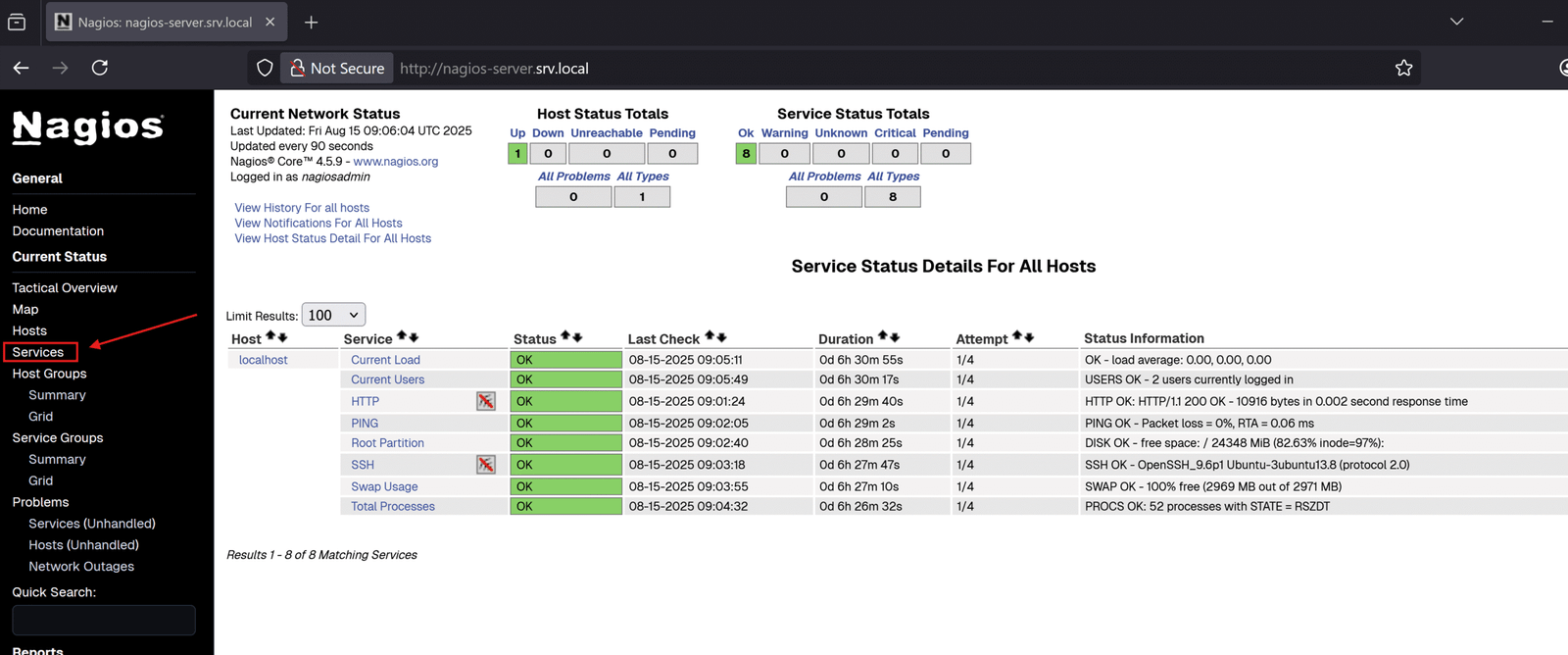
The command is to run Puppet with configurations from the environment feat_nagios_setup. We will have Nagios up and running after Puppet configures everything automatically. We can access URL nagios-server.srv.local (change to your corresponding URL) to test, we will see that Nagios is monitoring itself with host is “localhost”
Part 2: Setting up Consul Agent and Automatic Host and Service Detection
Just a quick note, at the moment, our Consul cluster is fresh without any nodes joined. Basically it shows like this:
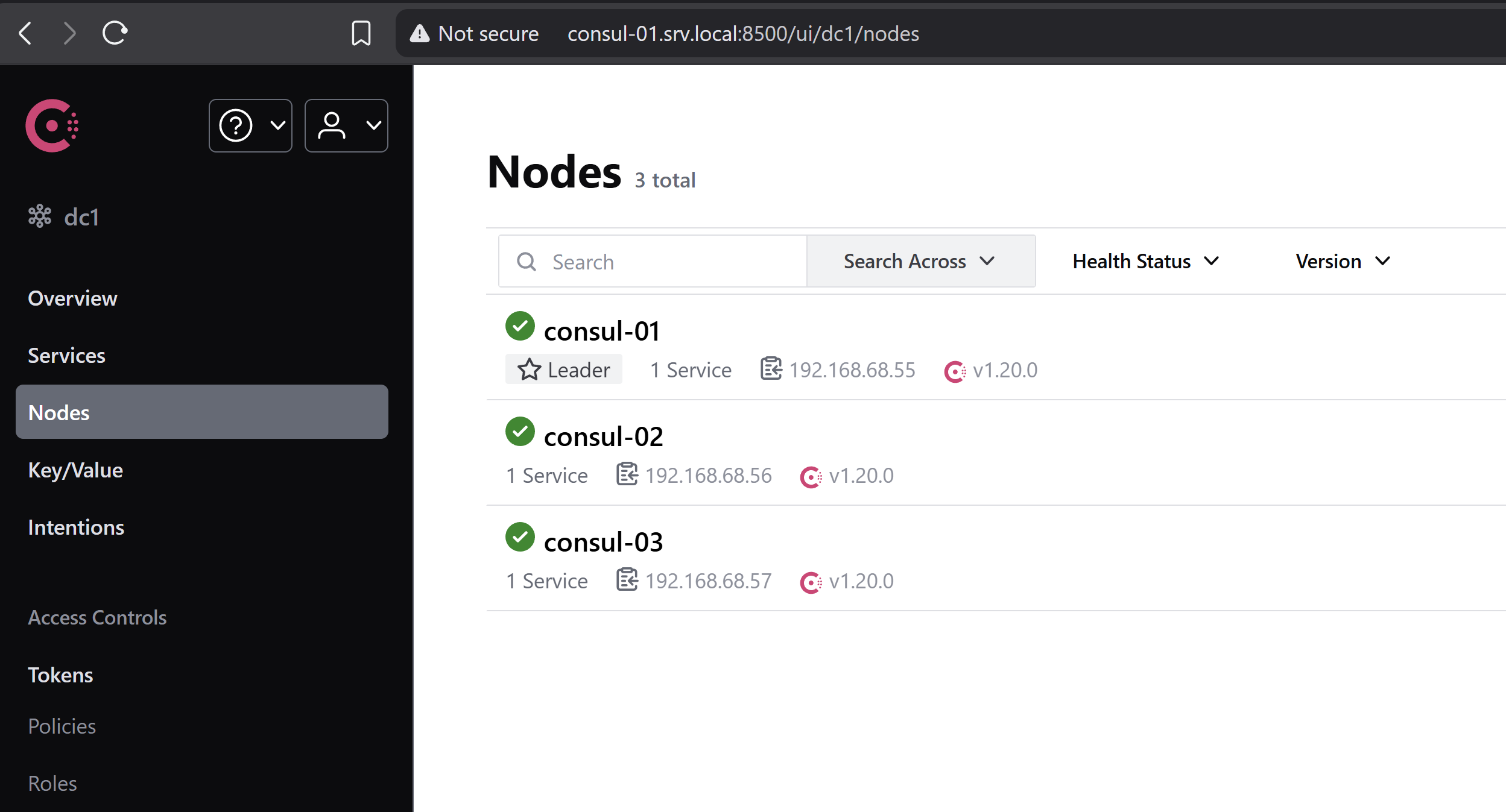
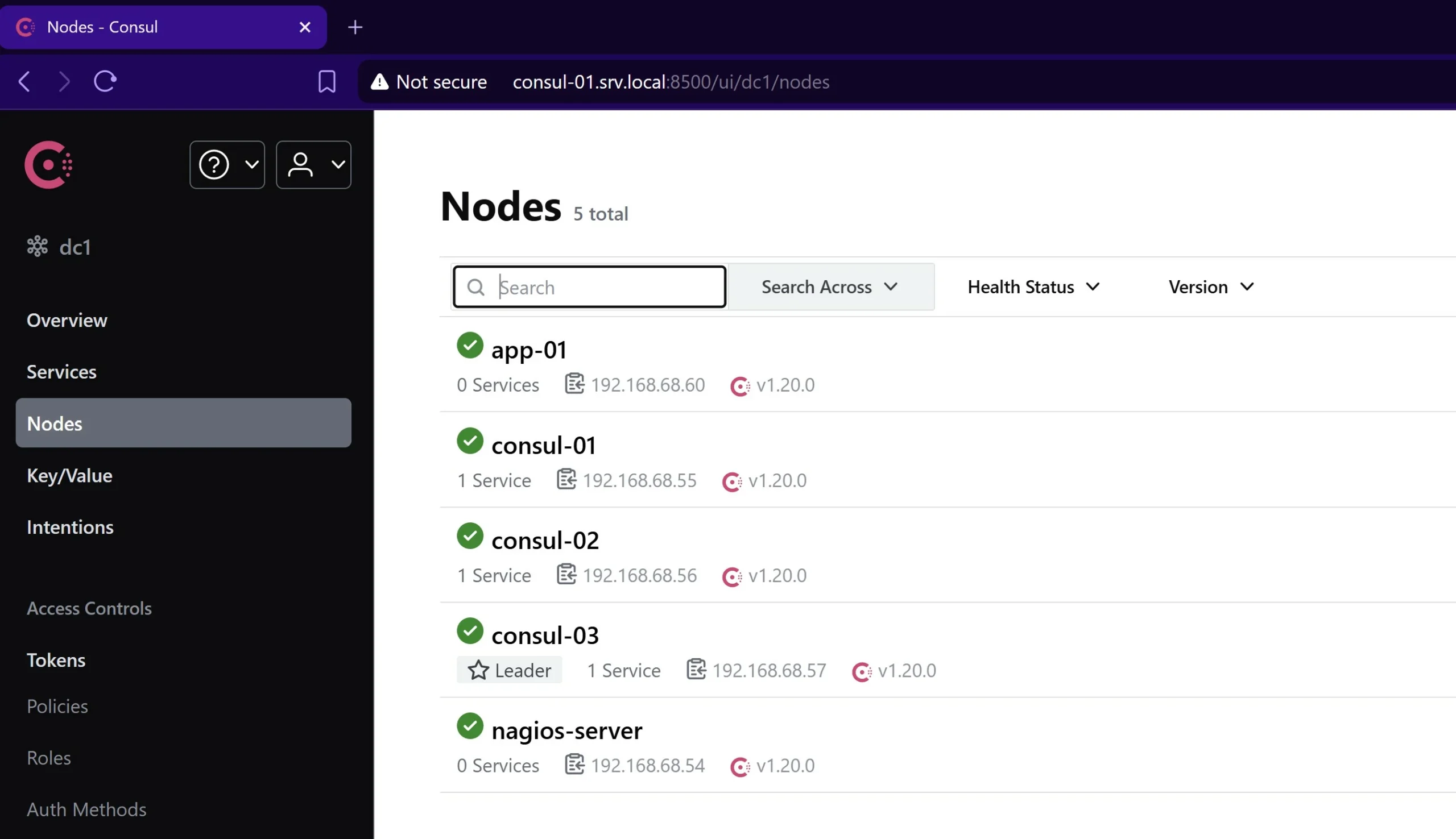
Once we have created all necessary classes in Puppet to set up Consul Agent as well as Auto Service Discovery, we will see app-01 and nagios-server appear here.
Update class roles::nagios
In the roles::nagios class that we defined in site/roles/manifests/nagios.pp, we need to append the following:
# Class: roles::base
#
# Install and Configure a Nagios server
#
class roles::nagios inherits roles::base {
  include profiles::nagios
  include profiles::nagios::nrpe
  include profiles::consul
  include profiles::consul::consul_template

  Class['profiles::consul'] -> Class['profiles::consul::consul_template']
}
I added profiles::consul class, which installs Consul and configure the server (nagios-server in this case) with agent mode. You can read more about this class in Puppet Series – Automate Consul Cluster Setup.
Regarding profiles::consul::consul_template class, I haven’t created this class yet. Therefore, we will set up this class at the next step.
Create a “profiles::consul::consul_template” class for installing and configuring consul-template binary.
Still under the project root path, we create site/profiles/manifests/consul directory, and also create site/profiles/manifests/consul/consul_template.pp file, and add the following content:
# Class: profiles::consul::consul_template
#
#
class profiles::consul::consul_template (
  String $package_name         = 'consul-template',
  String $package_ensure       = '0.41.3',
  String $repository_url       = "https://releases.hashicorp.com/${package_name}/${package_ensure}",
  String $full_pkg_name        = "${package_name}_${package_ensure}",
  # Should change the arch (_linux_amd64) to your corresponding arch. E.g. consul-template_linux_arm64.zip
  String $archive_name         = "${full_pkg_name}_linux_amd64.zip",
  String $download_url         = "${repository_url}/${archive_name}",
  String $install_path         = '/opt/consul-template',
  String $config_path          = '/etc/consul-template',
  String $usr_local_bin_path   = '/usr/local/bin',
  String $full_extracted_path  = "${install_path}/archives",
  String $consul_owner         = 'consul',
  String $consul_group         = 'consul',
) {
  # Ensure all file created with these owner/group/permission options
  File {
    owner => $consul_owner,
    group => $consul_group,
    mode  => '0644',
  }

  # Create necessary config paths
  file { [$install_path, $config_path, $full_extracted_path]:
    ensure => directory,
  }
  # Download the consul-template binary zip file and extract it to a desired path,
  # which is $full_extracted_path in this case
  archive { $archive_name:
    path         => "/tmp/${archive_name}",
    source       => $download_url,
    extract      => true,
    extract_path => $full_extracted_path,
    creates      => "${full_extracted_path}/${package_name}",
    cleanup      => true,
    require      => [File[$install_path], File[$full_extracted_path]],
  }

  # Create a symlink to /usr/local/bin/consul-template
  file { "${usr_local_bin_path}/${package_name}":
    ensure  => link,
    target  => "${full_extracted_path}/${package_name}",
    require => Archive[$archive_name],
  }

  # Set up a config file for consul-template. This is to tell consul-template where to query nodes' details.
  file { "${config_path}/config.hcl":
    ensure => 'file',
    source => "puppet:///modules/profiles/consul/${package_name}/etc/config.hcl",
  }

  # Set sudo permission to consul-template binary so that it can reload service as root
  file { '/etc/sudoers.d/sudo-consul':
    ensure  => 'file',
    content => "consul ALL = (root) NOPASSWD: ${usr_local_bin_path}/${package_name} *",
    owner   => 'root',
    group   => 'root',
  }

  # Create a systemd service config for consul-template.service.
  # This code block generates /etc/systemd/system/consul-template.service file with specified parameters below
  systemd::manage_unit { "${package_name}.service":
    unit_entry    => {
      'Description' => 'Consul-Template Daemon Service',
      'Wants'       => ['basic.target'],
      'After'       => ['basic.target', 'network.target'],
    },
    service_entry => {
      'User'              => $consul_owner,
      'Group'             => $consul_group,
      'ExecStart'         => "sudo ${usr_local_bin_path}/${package_name} -config ${config_path}",
      'SuccessExitStatus' => '12',
      'ExecReload'        => '/bin/kill -SIGHUP $MAINPID',
      'ExecStop'          => '/bin/kill -SIGINT $MAINPID',
      'KillMode'          => 'process',
      'Restart'           => 'always',
      'RestartSec'        => '42s',
      'LimitNOFILE'       => '4096',
    },
    install_entry => {
      'WantedBy' => 'multi-user.target',
    },
    enable        => true,
    active        => true, # 'true' means start this service after created
  }
}
This class needs a predefined template for /etc/consul-template/config.hcl file, we will create site/profiles/files/consul/consul-template/etc directory and create site/profiles/files/consul/consul-template/etc/config.hcl file with the following content:
consul {
  address = "localhost:8500"

  retry {
    enabled  = true
    attempts = 15
    backoff  = "250ms"
  }
}
Create a custom resource type for generating Nagios template config files and corresponding consul-template config files.
We will declare a profiles::nagios::consul_template class as the custom resource type, this resource type is similar to built-in resource types, such as file {}, user {}, and exec {}, etc. The primary purpose is to set up Nagios configuration template files and establish the corresponding Consul-template configuration files. Then, consul-template knows which Nagios template it should monitor and generate the real corresponding configuration files based on the Nagios-defined templates.
We create a site/profiles/manifests/nagios/consul_template.pp file with the following content:
# Class: profiles::nagios::consul_template
#
# This module manages the nagios consul templates
#
define profiles::nagios::consul_template (
  String        $perms = '0644',
  Array[String] $command = ["systemctl", "reload", "nagios"],
  String        $owner = 'consul',
  String        $group = 'consul',
) {
  $template = "/opt/consul-template/${name}.cfg.ctmpl"
  $target   = "${profiles::nagios::config_path}/objects/consul_sd_configs/${name}.cfg"
  $consul_template_conf_type = "/etc/consul-template/config-${name}.hcl"

  File {
    owner  => $owner,
    group  => $group,
    mode   => '0644',
  }
  # $template is the Definition Template for Nagios Host/Service
  file { $template:
    ensure => file,
    source => "puppet:///modules/profiles/nagios/consul-template/${name}.cfg.ctmpl",
    notify => Exec['Testing Nagios Config'],
  }

  # $target is the file generated by consul-template based on $template
  file { $target:
    ensure => file,
  }

  # $consul_template_conf_type is the consul-template config file.
  # This file is to tell which template it should watch, which is $template above in this case.
  file { $consul_template_conf_type:
    ensure  => file,
    content => template('profiles/consul-template/template.hcl.erb'),
  }
}
The profiles::nagios::consul_template relies on:
- Nagios Template files: are the Host/Service Definition Template files with placeholder fields that consul-template will query the node’s details and update the corresponding information.
- consul-template config files: are pieces of config files that we define which Nagios Template files it should monitor and generate the corresponding Nagios configurations.
Create Nagios Template files
We create site/profiles/files/nagios/consul-template folder, and create site/profiles/files/nagios/consul-template/nagios-hosts.cfg.ctmpl file with the following content:
## This file is managed and matained by consul-template
{{ range nodes }}
define host {
    address                        {{.Address}}
    alias                          {{.Node}}
    host_name                      {{.Node}}
    use                            all-servers
}
{{ end }}
Next, we continue creating site/profiles/files/nagios/consul-template/nagios-common-services.cfg.ctmpl with the following content:
{{ range nodes }}
define service {
    check_command                  check_nrpe!check_users
    host_name                      {{.Node}}
    notification_period            24x7
    service_description            Check users login
    use                            hosts-service
}

define service {
    check_command                  check_nrpe!check_load
    host_name                      {{.Node}}
    notification_period            24x7
    service_description            Check load service
    use                            hosts-service
}

define service {
    check_command                  check_nrpe!check_sda2
    host_name                      {{.Node}}
    notification_period            24x7
    service_description            Check disk space
    use                            hosts-service
}

define service {
    check_command                  check_nrpe!check_zombie_procs
    host_name                      {{.Node}}
    notification_period            24x7
    service_description            Check Zombie Procs
    use                            hosts-service
}

define service {
    check_command                  check_nrpe!check_total_procs
    host_name                      {{.Node}}
    notification_period            24x7
    service_description            Check Total Procs
    use                            hosts-service
}

{{ end }}
Create a config template file for consul-template
We create site/profiles/templates/consul-template/template.hcl.erb file and its directory. Then add the following content to the file
template {
  source      = "<%= @template %>"
  destination = "<%= @target %>"
  perms       = <%= @perms %>
  command     = <%= @command %>
}
function profiles::nagios::consul_template parses the predefined variables into the generated consul-template config files.
Create a role class for app-01 server
In this last part, we create a role class roles::application that applies profile-related classes to app-01 server. We create site/roles/manifests/application.pp and add the following content:
# Class: roles::application
#
# Inherit configurations from roles::base and install configurations for an app server
#
class roles::application inherits roles::base {
  include profiles::nagios::nrpe
  include profiles::consul
}
This class ensure all servers attaching to roles::application should have configurations from roles::base plus configurations from profiles::nagios::nrpe and profiles::consul.
Similar to Nagios server, we also need to instruct Hiera to know which role class app-01 should apply, still under the project root path, create data/nodes/app-01.srv.local.yaml file with content:
---
# Let Hiera knows that app-01 should use 'roles::application'
server::role: 'roles::application'
Ok, finally we completed all the necessary setup. It’s great that you have reached this stage. I know it’s a lot of configurations and hard to understand in the first place. I believe the more you work on this, the more knowledge you will gain. And later in the future, it will save you a lot of time in reinstalling and configuring Nagios server again.
Now, commit all your changes and push them to remote branch feat_nagios_setup. Then, log in the puppet-master and run r10k to deploy the branch into corresponding environments. I have r10k running automatically every 5 minutes so I don’t have to do this step. Just mentioned here in case you’re not having the same setup.
After that, on nagios-server and app-01 servers, we run:
sudo /opt/puppetlabs/bin/puppet agent -t --environment=feat_nagios_setup
Once it’s finished, you may want to access Nagios again to check. You will see app-01 automatically appears on the dashboard along with all checks
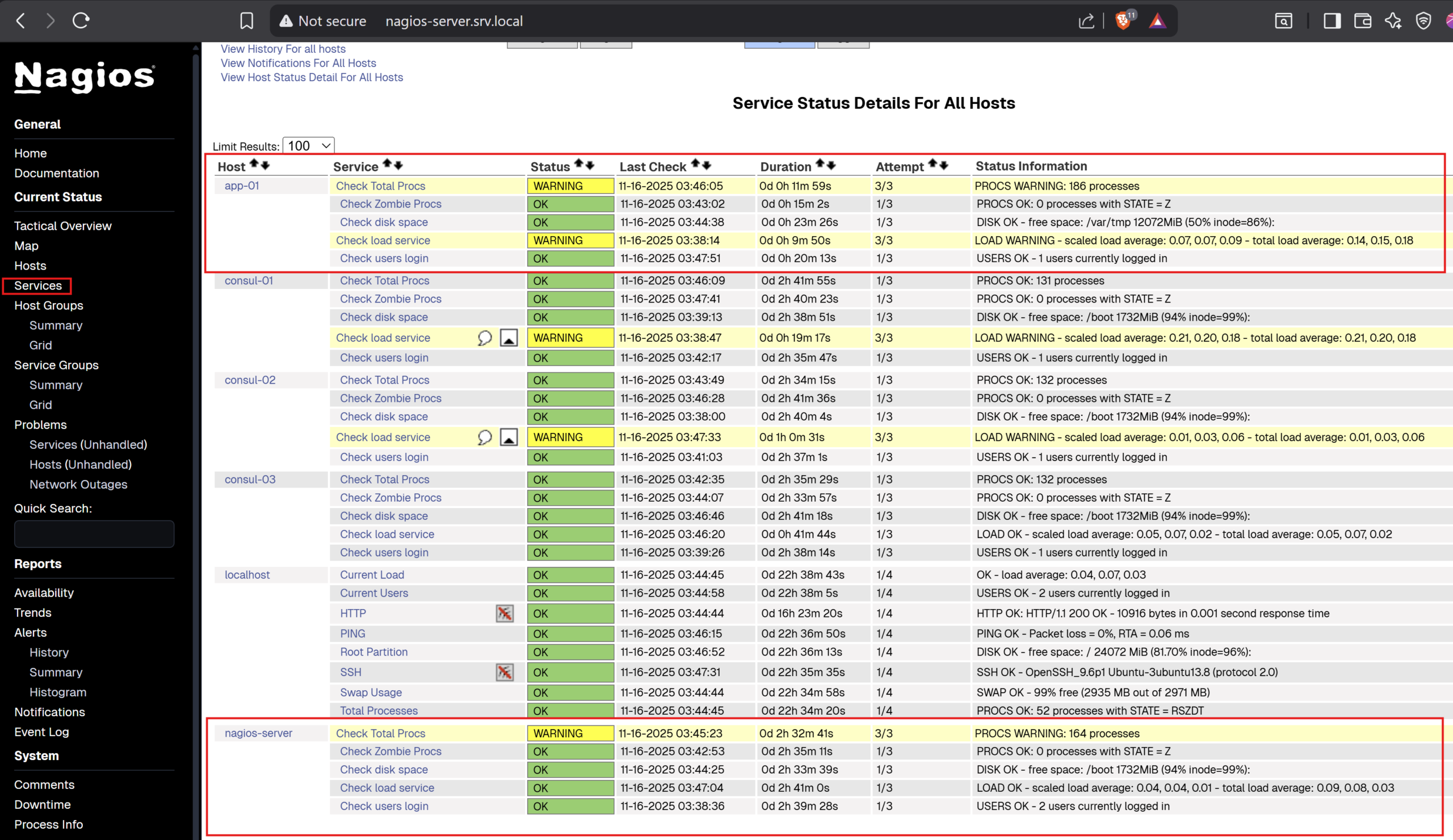
In my example, I did deploy configurations from feat_nagios_setup to all consul servers as well, that’s why you see they appear there.
If we check Consul dashboard again, we will see app-01 and nagios-server have joined the Consul cluster:
Conclusion
With the Puppet integration, we now can launch a Nagios server, and let Puppet set up everything automatically for us. It’s the same when we run Puppet on other hosts. Nagios auto-discover them once they’re joined into the Consul cluster without manual intervention.
The way I develop may not be completed a solution because we can tailor more than that to suit with our style. I just try to implement a basic workable solution so that you may learn about that. And with your knowledge, you might want to improve it more.
That’s all for this blog, it seems to be long but hopefully it helps you somewhat.
Share this:

Discover more from Turn DevOps Easier
Subscribe to get the latest posts sent to your email.