
 By Binh
There are multiple ways to deploy a Go app. However, there are two common ways we can easily find, and they are:
- Deploy with the binary to a VPS / Server: we simply compile the Go app into a binary file, upload the binary to the VPS/Server, and manage the app as a service through systemd. And also put the app behind a proxy, such as Nginx, to let Nginx handle SSL, traffic, etc.
- Deploy with Container: Similar to the above, we still need a binary file, but we put the binary file into a container instead, and deploy the container on platforms such as AWS ECS, Kubernetes, etc.
Actually, both of these deployment styles are not only for the Go app but also for any other applications/websites, etc. We can apply the same logic regardless of the programming languages in which the app is written. The difference lies at the compiling process, which not all languages need to compile, like Go.
In this article, we will deploy the binary to a virtual machine to demonstrate.
Why do we use Puppet to deploy?
To achieve the deployment styles that I mentioned above. We actually have many ways to implement, either to use old school way, like creating bash scripting (or other languages) to handle all manual steps, or use configuration management tools such as Puppet, Chef, Ansible, or use tools like GitLab CI/CD Pipelines, GitHub actions for automating deployments, or Kubernetes if your system is ideal for microservices, it’s more like DevOps styles nowadays.
I don’t believe we have a so-called one-size-fits-all solution. It’s always a matter of what is suitable for your situation the most. This is why Puppet still fits here. Honestly, I personally still like deployment with GitLab CI/CD Pipelines, but here are at least two reasons that we use Puppet:
- Your system is managed by Puppet: Imagine you have a hundred or a thousand physical servers, virtual machines, either in bare metal, or living on cloud services, such as AWS, Google, Azure, etc. And you use Puppet to manage the configuration for these servers already, so it’s probably easier for you automate the app deployment with Puppet without building so many tools/systems that you just use to deploy a single app.
- Your application is small and less changed: for small applications, we just want to update to new versions every time the app is released. No complicated tasks such as DB migration or specific tasks that you need for the app. An example of a small app is Adminer, a Database management in a single PHP file – we just want to keep the file up-to-date every time a new version is released.
For any complicated deployments, I still prefer to use a tool like GitLab CI/CD Pipelines, which allows me to add many more scripts/logic to control the deployment better, and also a more seamless way to roll back.
Prerequisites
- Require Puppet knowledge.
- Have Puppet Server installed. The Puppet Server applies a Roles and Profiles architecture that I implemented in the previous blogs. You may at least want to read Setup Puppet 8 on Ubuntu 24.04 – Configuration Management for a Scaling Enterprise and Mastering Puppet: Implementing Roles and Profiles Effectively in Reality to set up the prerequisites. For more information, you can look at other posts in Puppet Series.
- I will use a few Puppet methods in this article, such as
- Puppet Lookup Deep Merge Strategy: manipulating configuration for each application
- hiera-eyaml: encrypt/decrypt sensitive data for database credentials. See Managing Sensitive Data in Puppet Using Hiera-eyaml for more understanding.
- Custom Ruby function: is a function we write in Ruby, which helps Puppet facilitate custom checks that are hard to implement by just using Puppet language.
- Prepare another Ubuntu 24.04 server (called app-01). We deploy Go app to this server.
- Last but not least, we need an example of Go app. I’ll use my own todo-app here.
| Hostname | IP address | Role |
| puppet-master.srv.local | 192.168.68.117 | Puppet Server (Master) |
| app-01.srv.local | 192.168.68.60 | Run the application |
All the codes in this article can be found https://gitlab.com/binhdt2611/puppet-demo for your reference. For the changes in details, you can view them in this merge request.
(Optional) Prepare released packages of the Go app.
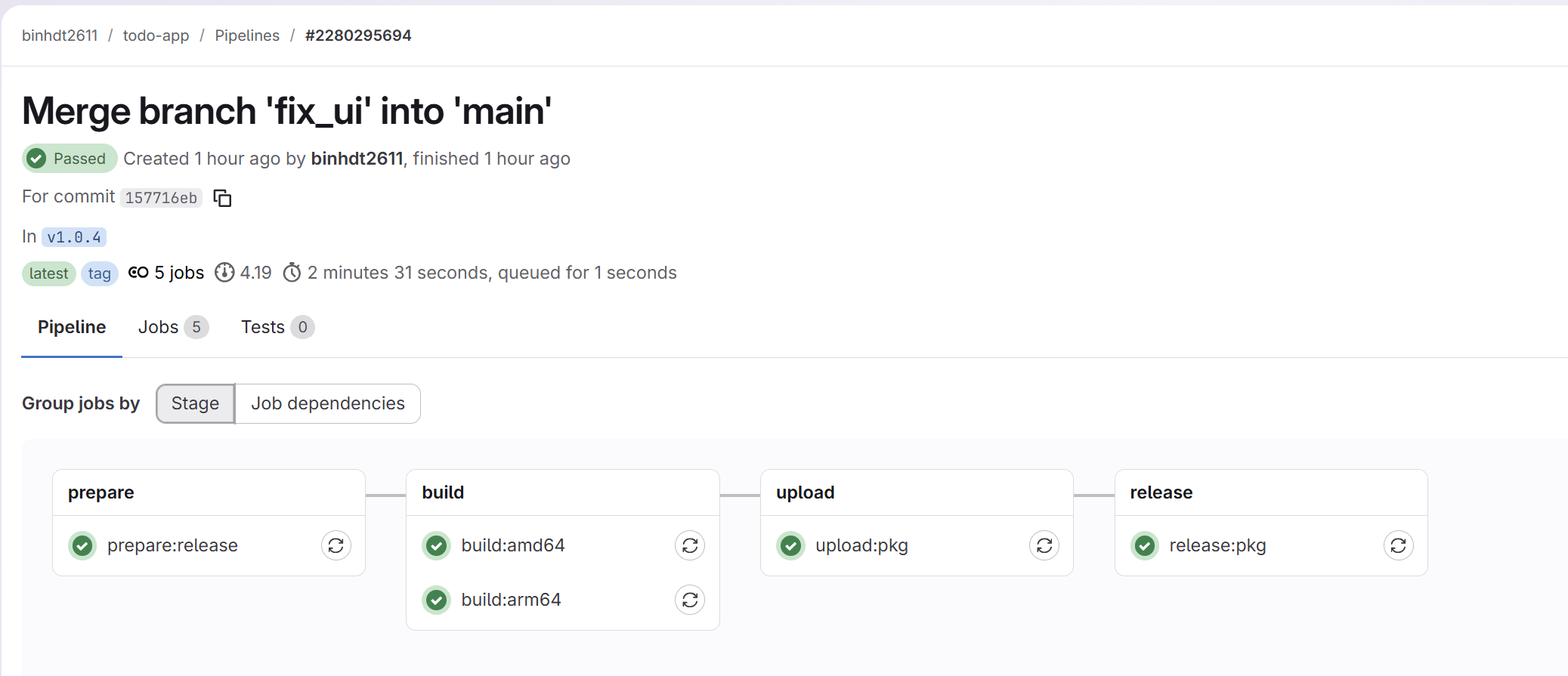
You might skip this part if you have your own packages. In my https://gitlab.com/binhdt2611/todo-app, I’ve set up an automatic release in the .gitlab-ci.yml file every time the project creates a new tag version. The GitLab Jobs will build two binary files in arm64/amd64 architecture and publish the packages to the Releases section. Here is one of the pipeline examples:
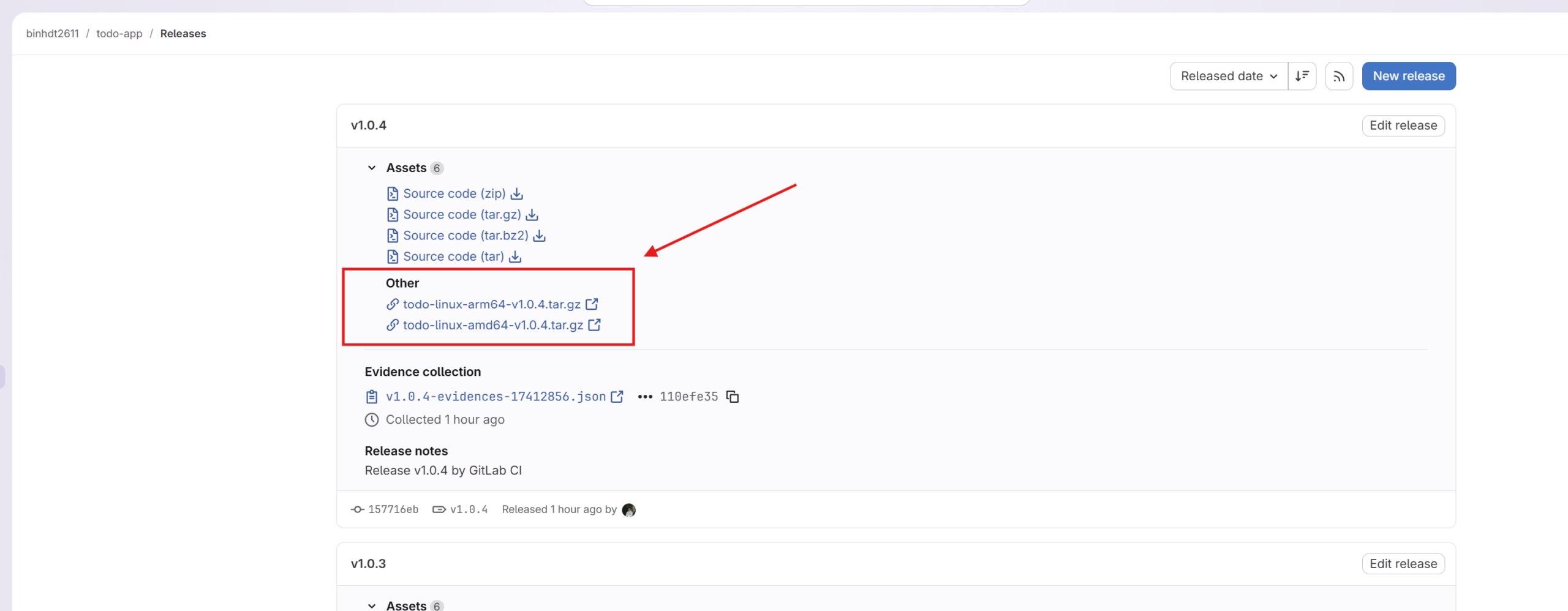
After the “release:pkg” publish package links, we will see packages are available to download in the Releases section
Create a custom Ruby function for Puppet
This part requires the Ruby language to develop. I know it sounds frustrating because we have to learn Puppet and Ruby. However, the Puppet is built in Ruby, so learning Ruby might get you more familiar with Puppet. Honestly, we don’t always need Ruby. We just use it when we need something more flexible to deal with.
You might want to look through writing custom functions in Ruby for Puppet to learn more about how it works. Basically, Puppet loads functions in the following locations:
| Function name | File location |
|---|---|
upcase | <MODULES DIR>/mymodule/lib/puppet/functions/upcase.rb |
upcase | /etc/puppetlabs/code/environments/production/lib/puppet/functions/upcase.rb |
mymodule::upcase | <MODULES DIR>/mymodule/lib/puppet/functions/mymodule/upcase.rb |
environment::upcase | /etc/puppetlabs/code/environments/production/lib/puppet/functions/environment/upcase.rb |
Under the project root path of https://gitlab.com/binhdt2611/puppet-demo, I configured environment.conf file with content like
modulepath = site:modulesThis indicates I have two <MODULES DIR>
The “site” and “modules” directories are placed in /etc/puppetlabs/code/environments/{your_environment}. The default environment is production.
Following the Roles/Profiles architecture, the “site” directory (known as <MODULES DIR>mymodule::upcase mentioned in the table above, when deploying the puppet-demo project to my Puppet Server, Puppet looks for a custom function (we will create profiles::get_latest_pkg_version later) in my “site” module path:
profiles::get_latest_pkg_version=><MODULES DIR>/profiles/lib/puppet/functions/profiles/get_latest_pkg_version.rb
Therefore, we need to create a function called profiles::get_latest_pkg_version. As usual from the previous blogs, under the project root path in puppet-demo, we create a branch named deploy_go_app, and start developing on this branch.
Simply create site/profiles/lib/puppet/functions/profiles/get_latest_pkg_version.rb
require 'net/http'
require 'json'

Puppet::Functions.create_function(:'profiles::get_latest_pkg_version') do
  dispatch :get_latest_pkg_version do
    param 'String', :api_url
    optional_param 'Integer', :limit
    return_type 'String'
  end

  def get_latest_pkg_version(api_url, limit = 3)
    # Raise Error if the request has more than 3 redirections (rare case)
    raise Puppet::Error, 'Too many redirects' if limit <= 0

    uri = URI(api_url)

    http = Net::HTTP.new(uri.host, uri.port)
    http.use_ssl = (uri.scheme == 'https')

    request = Net::HTTP::Get.new(uri)
    request['User-Agent'] = 'Puppet'

    response = http.request(request)

    case response
    when Net::HTTPSuccess
      data = JSON.parse(response.body)

      tag =
        data['tag_name'] ||          # GitHub & GitLab
        data.dig('release', 'tag')   # fallback

      raise Puppet::Error, "tag_name missing in #{data}" unless tag

      tag.sub(/^v/, '')

    # Handle GitLab API's redirection for the latest release
    when Net::HTTPRedirection
      location = response['location']
      new_uri = URI.join(uri, location)

      get_latest_pkg_version(new_uri.to_s, limit - 1)

    else
      raise Puppet::Error,
            "HTTP #{response.code} fetching #{api_url}: #{response.body}"
    end
  end
end
This function simply checks the latest release of a package on its own GitLab/GitHub api. And return the real version of the package. For example, my package has a tag_name is v1.0.4, the function returns 1.0.4.
Create a central “profiles::release” class
We will create a central profile class called profiles::release which we can apply to any node server that needs to deploy a specific application (the todo-app in our case).
Create a site/profiles/manifests/release.pp file. That’s where we add class profiles::release {}, and add the following content:
# Class: profiles::release
#
# Set up necessary files for an application and release application when it has new version
#
class profiles::release (
  Hash $applications,
) {
  include nginx
  $applications.each |String $app_name, Hash $configs| {
    profiles::release::app { $app_name:
      * => $configs,
    }
  }
}
The $applications parameter will be set in Hiera data later, we pass the application’s information to this parameter so that the resource profiles::release::app deploys applications with their own expected configurations.
Create a custom “profiles::release::app” resource type
A custom resource type in Puppet works similarly to built-in resource types. For example, we have user {} resource to create users, file {} resource to create files.
The resource profiles::release::app {} in this case is to deploy specified applications with expected configurations.
Create site/profiles/manifests/release/app.pp file along with its folder if you haven’t. And add the following content:
# Custom resource function: profiles::release::app
#
# Set up necessary files for an application and release application when it has new version
#
#  NOTE: some of parameters below have default options. That means we don't need to provide value in case we want to change.
#
#  @param project_path: is the directory that stores the app.
#  @param project_name: name of the project on e.g. GitLab or GitLab where we store the app.
#  @param project_id: is the project's ID. This is for projects on GitLab.
#  @param prefix_api_url: is the prefix url of api link for $release_api_url and $download_url
#     e.g. we have https://gitlab.com/api/v4/projects/{project_id}/releases/permalink/latest
#     the $prefix_api_url should be https://gitlab.com/api/v4/projects
#
#  @param release_api_url: is the api link where we get the latest version of the app
#  @param download_url: is the app's downloadable link for the new released version
#  @param archive_path: is the archive directory where we store multiple app's versions
#  @param resource_tag: is the tag that we can specify Puppet to run this class only
#  @param app_port: is the app's port
#  @param domain_url: is the domain that we want to set up in Nginx to acces app.
#                     App behinds Nginx through Proxy.
#  @param app_owner: is the user who owns the app. We run this app under this user.
#  @param app_group: is the Group who owns the app.
#  @param app_command: is the main command to run the app.
#  @param app_command_path: is the full path of main command
#  @param app_command_args: is the args that we want to pass in along with the main command.
#  @param db_host: is the database's host. (IP address or domain)
#  @param db_port: is the database's port
#  @param db_username: is the database's username
#  @param db_password: is the database's password
#  @param db_name: is the database's name
#  @param db_config_filename: is the config filename for the database connection
#  @param db_config_filepath: is the full path of the $db_config_filename.
#  @param arch: is the architecture of the archive file E.g. amd64
#  @param app_service_name: is the app's service name that Puppet should start through systemd
define profiles::release::app (
  String $project_path     = "/data/app/${name}",
  String $project_name     = $name,
  String $project_id,
  String $prefix_api_url,
  String $release_api_url  = '',
  String $download_url     = '',
  String $archive_path     = "${$project_path}/archived",
  String $archive_name     = '',
  String $resource_tag     = "release-${name}",
  Integer $app_port         = 8080,
  String $domain_url       = $trusted['certname'],
  String $app_owner        = 'run-app',
  String $app_group        = 'run-app',
  String $app_command      = $name,
  String $app_command_path = "${project_path}/${name}",
  Array  $app_command_args = [],
  String $db_host,
  Integer $db_port,
  String $db_username,
  String $db_password,
  String $db_name,
  String $db_config_filename = 'database_config.yaml',
  String $db_config_filepath = "${project_path}/${db_config_filename}",
  String $arch               = '',
  String $app_service_name   = "${name}-app",
) {
  include stdlib
  # Escaping to avoid systemd break
  # E.g. someone passes "--config=/etc/my app/config.yaml" into args.
  #      it should become "--config=/etc/my\ app/config.yaml"
  $app_cmd_args_escaped = $app_command_args.map |$arg| {
    stdlib::shell_escape($arg)
  }.join(' ')

  # Default to Gitlab's API latest release if not specified
  # see https://docs.gitlab.com/api/releases/#get-the-latest-release
  $real_release_api_url = $release_api_url ? {
    ''      => "${prefix_api_url}/${project_id}/releases/permalink/latest",
    default => $release_api_url,
  }

  if empty($arch) {
    case $facts['os']['architecture'] {
      'x86_64', 'amd64': {
        $real_arch = 'amd64'
      }
      'aarch64': {
        $real_arch = 'arm64'
      }
      default:           {
        fail("Unsupported kernel architecture: ${facts['os']['architecture']}")
      }
    }
  } else {
    $real_arch = $arch
  }

  # Create User and Group
  group { $app_group:
    ensure => 'present',
  }

  user { $app_owner:
    ensure => 'present',
  }

  # Set all files generated by this 'profiles::release::app' with specified User/Group
  File {
    owner   => $app_owner,
    group   => $app_group,
  }

  # Create corresponding paths for the app
  file { [$project_path, $archive_path]:
    ensure  => directory,
    require => [Group[$app_group], User[$app_owner]],
  }

  # Create a database config file with provided parameters for the app
  file { $db_config_filepath:
    ensure  => file,
    content => template("profiles/release/${db_config_filename}.erb"),
    require => [Group[$app_group], User[$app_owner]],
  }

  # Get the latest version of the app
  # This is to ensure the app is updated when we release new version
  $version = profiles::get_latest_pkg_version($real_release_api_url)

  # If we set $archive_name, it overrides the $version above.
  # We have to set correct version of the archived package
  $real_archive_name = $archive_name ? {
    ''      => "${name}-linux-${real_arch}-v${version}.tar.gz",
    default => $archive_name,
  }

  # Default to Gitlab's API for generic packages if not specified
  # see https://docs.gitlab.com/user/packages/generic_packages/
  $real_download_url = $download_url ? {
    ''      => "${prefix_api_url}/${project_id}/packages/generic/${project_name}/${version}/${real_archive_name}",
    default => $download_url,
  }

  # Download the app package and extract it into $archive_path
  archive { "${archive_path}/${real_archive_name}":
    ensure       => present,
    source       => $real_download_url,
    cleanup      => false,
    extract      => true,
    extract_path => $archive_path,
    creates      => "${archive_path}/${name}-${version}",
    user         => $app_owner,
    group        => $app_group,
    tag          => $resource_tag,
    require      => File[[$project_path, $archive_path]],
  }

  # Make a symlink of the real binary app in $archive_path
  # When the 'archive' resource runs, it downloads the specified app's version if detected.
  # This ensure the link pointed to the new version
  file { $app_command_path:
    ensure  => link,
    target  => "${archive_path}/${name}-${version}",
    owner   => $app_owner,
    group   => $app_group,
    require => Archive["${archive_path}/${real_archive_name}"],
    tag     => $resource_tag,
    notify  => Service[$app_service_name],
  }

  # Create a systemd service config for $app_service_name-app.service.
  # This code block generates /etc/systemd/system/$app_service_name-app.service file with specified parameters below
  systemd::manage_unit { "${app_service_name}.service":
    unit_entry    => {
      'Description' => "${name} App Service",
      'Wants'       => ['basic.target'],
      'After'       => ['basic.target', 'network.target'],
    },
    service_entry => {
      'User'             => $app_owner,
      'Group'            => $app_group,
      'WorkingDirectory' => $project_path,
      'ExecStart'        => "${app_command_path} ${app_cmd_args_escaped}",
      'KillMode'         => 'process',
      'Restart'          => 'on-failure',
      'RestartSec'       => '10s',
    },
    install_entry => {
      'WantedBy' => 'multi-user.target',
    },
    require       => [File[$app_command_path], Archive["${archive_path}/${real_archive_name}"]],
    tag           => $resource_tag,
  }

  service { $app_service_name:
    ensure  => running,
    enable  => true,
    require => Systemd::Manage_unit["${app_service_name}.service"],
    tag     => $resource_tag,
  }

  # Configure Nginx host to forward requests to the specified "application" app
  nginx::resource::server { $domain_url:
    listen_port => 80,
    proxy       => "http://localhost:${app_port}",
    require     => Service[$app_service_name],
    tag         => $resource_tag,
  }

  # Reload Nginx when it detects a new app version is released
  exec { "reload-nginx-for-${name}":
    command     => 'nginx -t && nginx -s reload',
    path        => ['/usr/bin', '/bin', '/usr/sbin'],
    refreshonly => true,
    require     => [File[$app_command_path], Archive["${archive_path}/${real_archive_name}"]],
  }

  # Make Reload Nginx run after all other resources
  File<| tag == $resource_tag |> ~> Exec["reload-nginx-for-${name}"]

  # Create a cron job release to make it automatically run to check whether it has new version every 5 minutes
  cron { "${name}-update":
    ensure  => present,
    command => "/opt/puppetlabs/bin/puppet agent -t --tags ${resource_tag} >> /var/log/puppetlabs/${name}.log 2>&1 ",
    user    => 'root',
    minute  => 5,
    tag     => $resource_tag,
  }
}
With this setup, I’m trying to automate as much as possible so that the resource function is able to work with mostly with packages in GitLab, if you use for GitHub, need to adjust more logic here. If you use my code, probably need to adjust more in order to achieve your result. Here is just a showcase of how Puppet deploy my application.
In summary, the resource profiles::release::app {} performs the following actions:
- create user/group for owning the application
- create corresponding directories for each application
- download the app package and extract it to expected location
- update symlink of the app path to point the latest archived version
- create Systemd service to mange the specified application.
- generate Nginx config files to work as proxy for the application
- create a cron job to run every 5 minutes, if it detects the application has a new version, deploys it, otherwise, it does nothing
Create environment config template
In the resource profiles::release::app {}, my application needs to read an environment config file under the application path to get the database’s credentials. We need to create a template so that each time the resource profiles::release::app {} runs, it sets up the environment config file with expected value.
I use this config file for storing DB’s credentials, therefore, I’ll create site/profiles/templates/release/database_config.yaml.erb and its own folder, and add the following content:
production:
  host: <%= @db_host %>
  port: <%= @db_port %>
  postgres_user: <%= @db_username %>
  postgres_password: <%= @db_password %>
  db_name: <%= @db_name %>
If your template file has different name, you need to update $db_config_filename with your own value. Or if you don’t need, simply to delete the template file, along with the code written for this file setup in file { $db_config_filepath: ... }
Other values related to DB’s credentials will be searched by Puppet through Hiera-eyaml, which we create later.
Create Hiera data for managing app configurations and its sensitive data
The class profiles::release requires $applications parameter, we will update the data/nodes/app-01.srv.local.yaml (I created in the previous blogs) which it tells Puppet should apply the specified role class, and search for data of $applications parameter in profiles::release::applications keyword
---
# Let Hiera knows that app-01 should use 'roles::application'
server::role: 'roles::application'


# The lookup_options makes profiles::release::applications merge the DB credentials
# that we defined in data/secrets/app-01.srv.local.eyaml
lookup_options:
  profiles::release::applications:
    merge: deep

#
profiles::release::applications:
  # Here are the list of parameters at least I need to configure my todo-app
  # You could set more or less depends on your app.
  todo:
    # the parameters below correlate with parameters set in the profiles::release::app resource
    prefix_api_url: 'https://gitlab.com/api/v4/projects'
    project_id: '63145046'
    domain_url: 'mytodo.srv.local'
    app_command_args:
      - 'agent'
    db_host: 'todo-postgres.srv.local'
    db_port: 5432
    db_name: 'todos'
We still lack $db_username and $db_password for todo app, but we should encrypt the content for these parameter rather than setting them in plain-text.
Under project root path at local machine, I run command below for each real value of $db_username and $db_password:
# Enter the real db_username
eyaml encrypt -p
Enter password: ********
Output looks similar like:
# I shorten the encrypted string, it should be longer when you run
string: ENC[PKCS7,MIIBeQYJKoZIhvcNAQcDoIIBajCCAWYCAQAxggEhMII.....MgiJKWuCCNQZwxUJE2pqE]

OR

block: >
  ENC[PKCS7,MIIBeQYJKoZIhvcNAQcDoIIBajCCAWYCAQAxggEhMIIBHQIBAD
  .....
  Kk8xO9e5jsOAU4gBAMPq/tBp72Bc45wPLrbSVl]
Repeat the same process for db_password. Afterwards, copy the contents either from string: or blocks: (do for both db_username and db_password), and continue the next step.
Note: the reason I can create an encrypted string like this is because I have configured hiera-eyaml for Puppet. Please read Managing Sensitive Data in Puppet Using Hiera-eyaml for more information.
Create data/secrets/app-01.srv.local.eyaml file with content:
---
# The lookup_options makes profiles::release::applications merge the DB credentials
# into the object we defined in data/nodes/app-01.srv.local.yaml
lookup_options:
  profiles::release::applications:
    merge: deep

# Paste your corresponding encrypted strings to replace values of $db_username and $db_password below
profiles::release::applications:
  todo:
    db_username: >
      ENC[PKCS7,MIIBeQYJKoZIhvcNAQcDoIIBajCCAWYCAQAxggEhMIIBHQIBAD
      .....
      Kk8xO9e5jsOAU4gBAMPq/tBp72Bc45wPLrbSVl]
    db_password: >
      ENC[PKCS7,MIIBeQYJKoZIhvcNAQcDoIIBajCCAWYCAQAxggEhMIIBHQIBAD
      ....
      Kk8xO9e5jsOAU4gBAMPq/tBp72Bc45wPLrbSVl]
When Puppet applies configuration on app-01 server, the profiles::release::applications keyword will be merged from both data/nodes/app-01.srv.local.yaml and data/secrets/app-01.srv.local.eyaml into a single object.
Update a role class for applications
I had site/roles/manifests/application.pp file already (created since previous blogs) which contain roles::application {} class. Any node server that have server::role keyword set to ‘roles::application’ class in hiera data will use this roles::application class.
My app-01.srv.local is set to use this role class, so we append profiles::release class into this role class in order to tell Puppet which profile class it should apply.
# Class: roles::application
#
# Inherit configurations from roles::base and install configurations for an app server
#
class roles::application inherits roles::base {
  # Other profile classes
  # ...

  include profiles::release
}
Ok. Commit all changes in the deploy_go_app branch, and push your changes to the remote repo.
My puppet-master has r10k configured, r10k will roll out the deploy_go_app branch to the corresponding puppet environment for me.
Testing
Afterwards, we will log in app-01 server, and test the new Puppet code on our deploy_go_app branch. Simply run:
sudo /opt/puppetlabs/bin/puppet agent -t --environment=deploy_go_appWait for the Puppet to finish deployment of your app.
Once it’s done. We check whether user/group are created (should be run-app by default):
sudo cat /etc/passwd | grep run-app
Output:

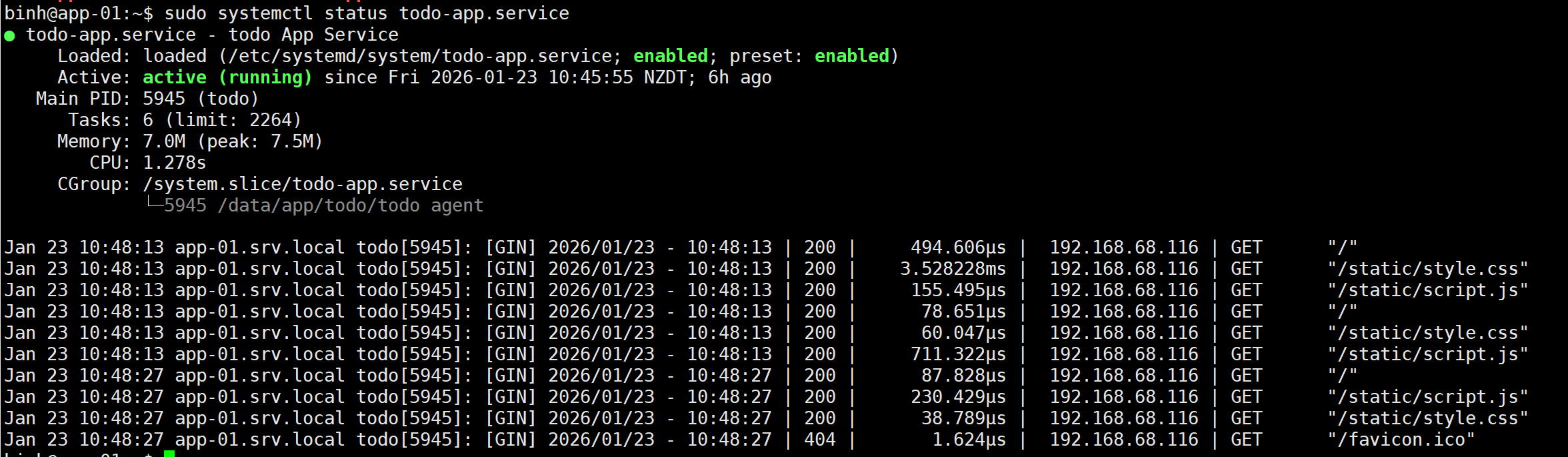
Check the todo-app service started
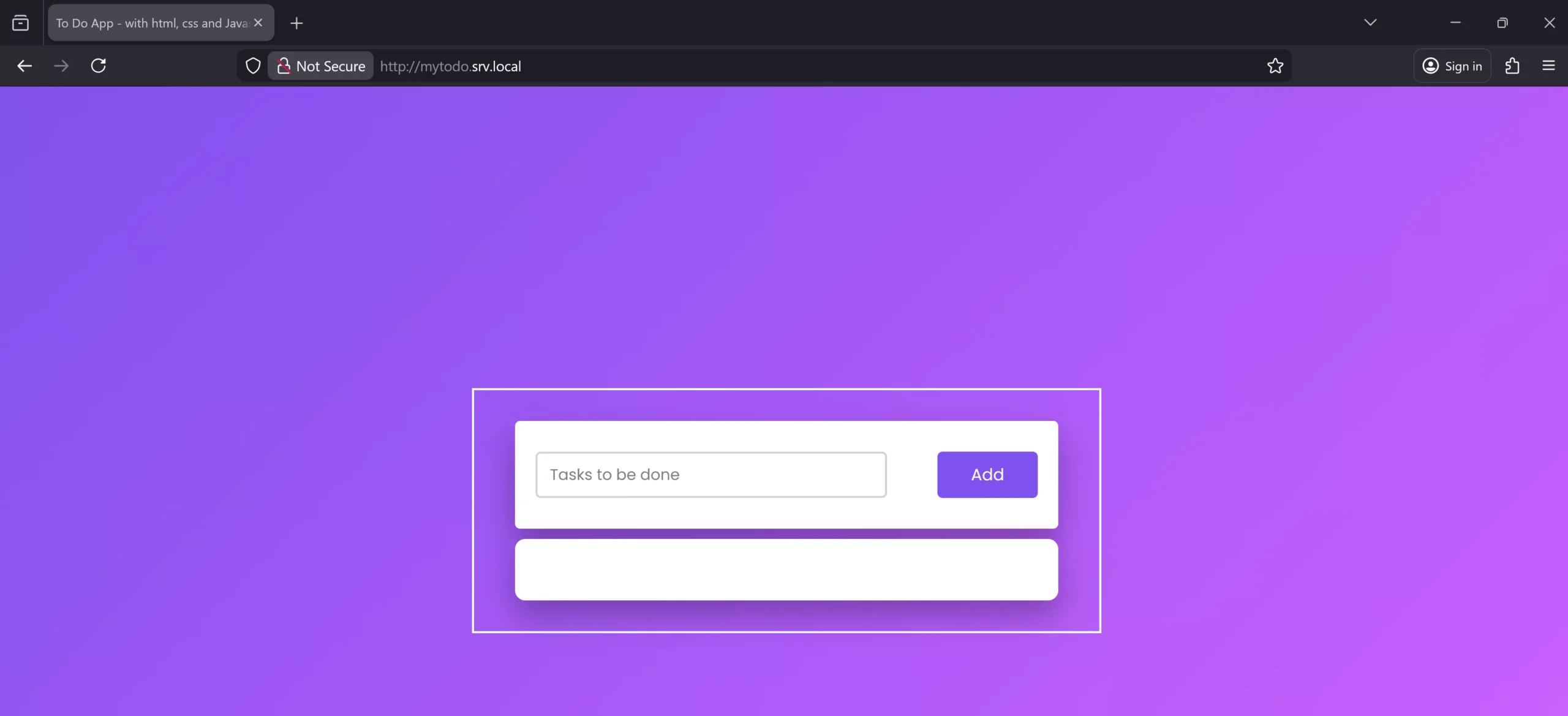
Access http://mytodo.srv.local to see whether the app is accessible through Nginx.
Here is a list of folders, and all archived packages are set up after a few releases.
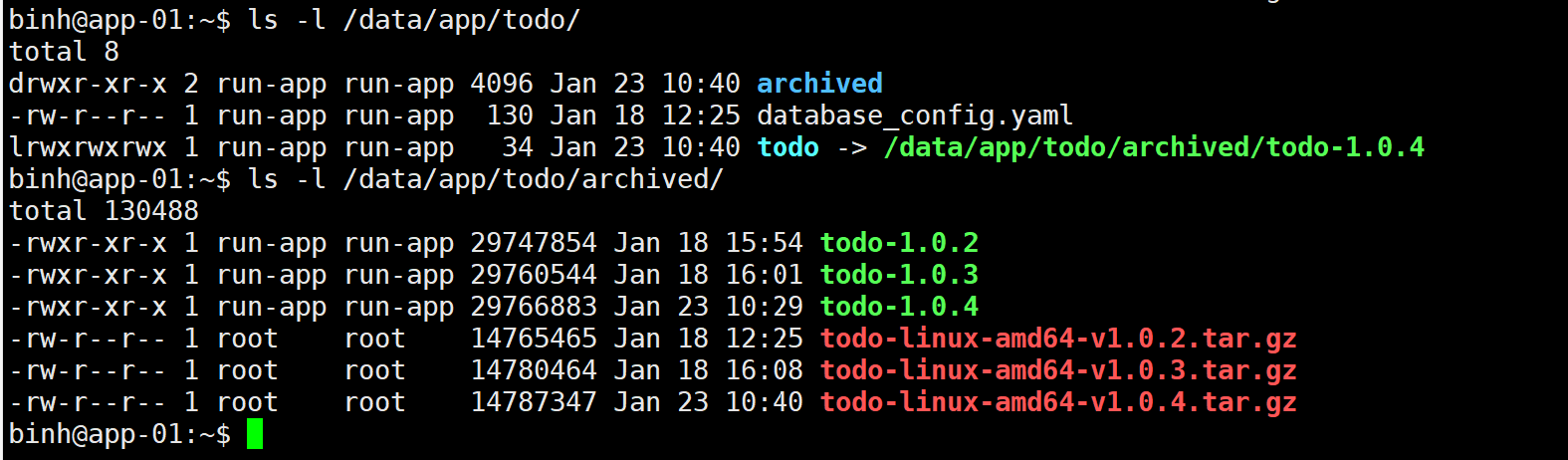
I have a few versions of my todo-app, and it’s updated to the latest version with the symlink at /data/app/todo/todo as you can see.
That’s all for this blog. Don’t forget to merge the deploy_go_app branch into production branch after your testing. Thanks for your reading.
Share this:

Discover more from Turn DevOps Easier
Subscribe to get the latest posts sent to your email.